Flutter: древовидный список с анимацией
Задача: показать двухуровневый список с анимацией отображения выбора второго уровня.
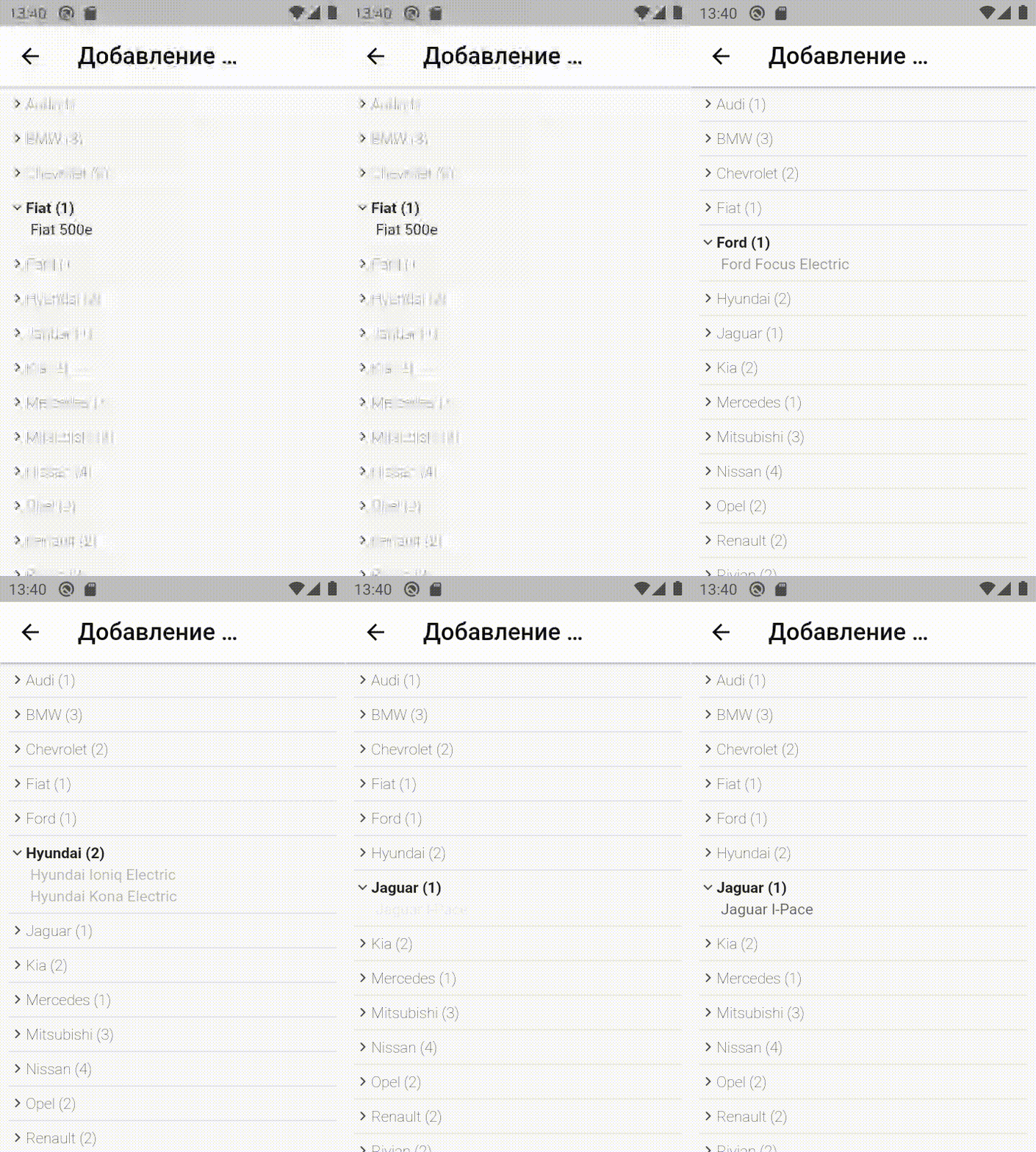
Что сделаем? Отображением займутся два вложенных друг в друга ListView.builder. Отлавливает выбор модели при помощи GestureDetector и при отрисовке второго ListView.builder со списокм автомобилей, показываем только совпадающие с моделью. Также отображение моделей обертываем в AnimatedOpacity для плавного показа.
class _AddAutoState extends State<AddAuto> {
  final AddAuto_scaffoldKey = GlobalKey<ScaffoldState>();
  bool auto_list_is_loading=false;
  List ListAutoes=[];
  List FilteredListAutoes=[];
  int cur_model_select=0;
  void LoadListAutoes(context){
    TRequests req=new TRequests();
    req.request("GetListVendorsAndModels", jsonEncode({}), (List result){
      setState(() {
        ListAutoes=result;
        FilteredListAutoes=result;
        auto_list_is_loading=true;
      });
    }, (String error){
      EasyLoading.showToast(error);
    });
  }

  @override
  void initState() {
    WidgetsBinding.instance.addPostFrameCallback((_) => LoadListAutoes(context));  // эвент после того как страница отобразилась - обновим данные по пользователю
  }

  @override
  Widget build(BuildContext context) {
    return Scaffold(
        key: AddAuto_scaffoldKey,
        appBar: AppBar(
          iconTheme: IconThemeData(color: Colors.black),
          backgroundColor: Colors.white,
          //automaticallyImplyLeading: false, // убрать кнопку "назад"
          title: Text('Добавление автомобиля', style: TextStyle(fontFamily: 'Poppins', color: Colors.black, fontSize: 22,),),
          actions: [],
          centerTitle: false,
          elevation: 2,
        ),
        body:
        SingleChildScrollView(
          child:
          Column(
            children: [
              Visibility(
                  visible: auto_list_is_loading,
                  child:
                  Container(
                    padding: const EdgeInsets.all(8),
                    child:
                    ListView.builder(
                        shrinkWrap: true,
                        physics: NeverScrollableScrollPhysics(),
                        padding: const EdgeInsets.all(0),
                        itemCount: FilteredListAutoes.length,
                        itemBuilder: (BuildContext context, int index) {
                          return GestureDetector(
                              onTap: () {
                                setState(() {
                                  print("тыкнули по модели автомобиля..");
                                  cur_model_select=index;
                                });
                              },
                              child:
                              Column(
                                  children: [
                                    Row(
                                      mainAxisSize: MainAxisSize.max,
                                      mainAxisAlignment: MainAxisAlignment.start,
                                      children: [
                                        Container(
                                          height: 16,
                                          width: 16,
                                          child:
                                            Transform.rotate(
                                              angle: index==cur_model_select?90 * 3.14/180:0,
                                              child:
                                                IconButton (
                                                  padding: const EdgeInsets.all(0),
                                                  icon: SvgPicture.asset('lib/images/arrow-right-small.svg',height: 16,width: 16,),
                                                  onPressed: () {print('IconButton pressed ...');},
                                                ),
                                            )
                                        ),
                                        Text(
                                            FilteredListAutoes[index]["name"]+" ("+FilteredListAutoes[index]["cars"].length.toString()+")",
                                            style: TextStyle(
                                                fontWeight: index==cur_model_select?FontWeight.bold:FontWeight.w100,
                                            )
                                        )
                                      ],
                                    ),
                                    // рисуем список автомобилей
                                        AnimatedOpacity(
                                          opacity: index==cur_model_select ? 1.0 : 0.0,
                                          duration: const Duration(milliseconds: 1500),
                                          child:
                                          ListView.builder(
                                              shrinkWrap: true,
                                              physics: NeverScrollableScrollPhysics(),
                                              padding: const EdgeInsets.all(0),
                                              itemCount: FilteredListAutoes[index]["cars"].length,
                                              itemBuilder: (BuildContext context, int index2) {
                                                return
                                                  Visibility(
                                                    visible: index==cur_model_select?true:false,
                                                    child:
                                                        Padding(
                                                            padding: const EdgeInsets.only(left: 20,top: 4),
                                                            child:
                                                            GestureDetector(
                                                              onTap: () {
                                                                print("тыкнули по автомобилю.."+index2.toString());
                                                              },
                                                              child: Text(FilteredListAutoes[index]["cars"][index2]["name"]),
                                                            )
                                                        )
                                                  );
                                              }
                                          ),
                                    ),
                                    new Divider()
                                  ]
                              )
                          );
                        }
                    ),
                  )
              ),
              Visibility(
                  visible: !auto_list_is_loading,
                  child:
                  Column(
                      crossAxisAlignment: CrossAxisAlignment.start,
                      children: const [
                        CardLoading(
                          height: 30,
                          borderRadius: BorderRadius.all(Radius.circular(15)),
                          width: 100,
                          margin: EdgeInsets.only(bottom: 10),
                        ),
                        CardLoading(
                          height: 100,
                          borderRadius: BorderRadius.all(Radius.circular(15)),
                          margin: EdgeInsets.only(bottom: 10),
                        ),
                      ]
                  )
              ),
            ],
          )
        )
    );
  }
}