А в этом нам поможет плагин jsPlumb, к Jquery. В использовании он весьма прост, достаточно подключить его после jquery, а так-же css стили идущие в комплекте к jsPlumb, для преобразования в слоев в визуально приятную форму. Далее в html, расставляем div с идентификаторами и текстом внутри. После чего, простейший вызов, даст соединенные между собой div, линиями.
 $(«#block1»).jsplumb({target: ‘sblock2’});
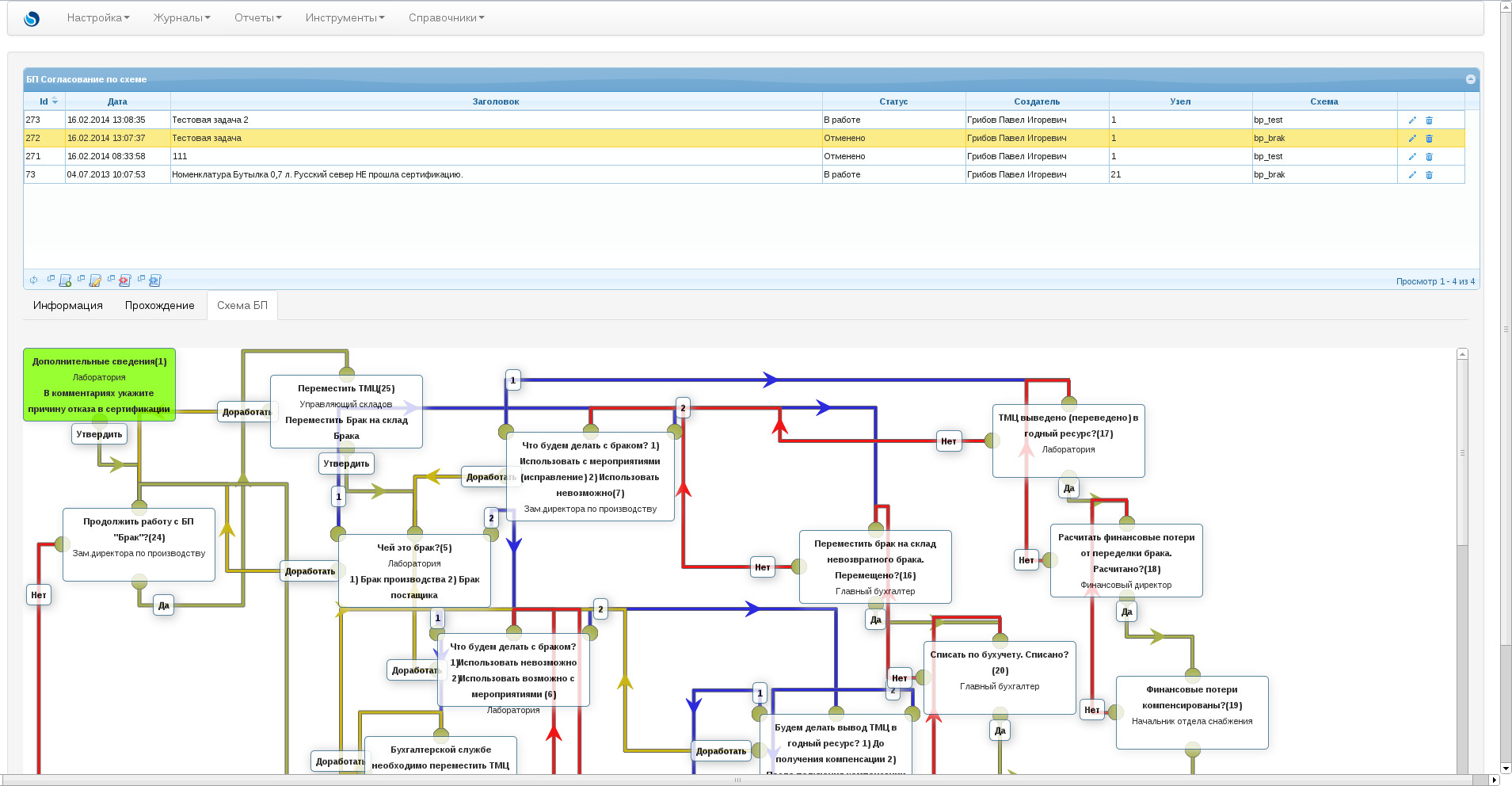
Очень простой API можно почитать здесь. У меня например получилась очень красивая картинка, при рисовании схем «Бизнес процессов:
Использую сей плагин, при рисовании картинок из xml. Вот пример кода вывода картинки:
<?php

// Данный код создан и распространяется по лицензии GPL v3
// Изначальный автор данного кода - Грибов Павел
// http://грибовы.рф

include_once ("../../../../config.php");                    // загружаем первоначальные настройки

// загружаем классы

include_once("../../../../class/sql.php");               // загружаем классы работы с БД
include_once("../../../../class/config.php");		// загружаем классы настроек
include_once("../../../../class/users.php");		// загружаем классы работы с пользователями
include_once("../../../../class/employees.php");		// загружаем классы работы с профилем пользователя
include_once("../../../../class/bp.php");		// загружаем классы работы c "Бизнес процессами"

// загружаем все что нужно для работы движка

include_once("../../../../inc/connect.php");		// соеденяемся с БД, получаем $mysql_base_id
include_once("../../../../inc/config.php");              // подгружаем настройки из БД, получаем заполненый класс $cfg
include_once("../../../../inc/functions.php");		// загружаем функции
include_once("../../../../inc/login.php");		// логинимся

$bpid=_GET("bpid");
function plumb($t1,$t2,$a1,$a2,$title,$color){
echo 'jsPlumb.connect({
    source:"'.$t1.'",
    target:"'.$t2.'",
    connector:["Flowchart", { curviness:70 }],
			   	anchors:["'.$a1.'", "'.$a2.'"],
			   	paintStyle:{
					lineWidth:3,
					strokeStyle:"'.$color.'",
					outlineWidth:1,
					outlineColor:"#666"
				},
				endpointStyle:{ fillStyle:"#a7b04b" },
	   	overlays : [
					["Label", {
						cssClass:"l1 component label",
						label : "'.$title.'",
						location:0.1,
						id:"label"
					}],
					["Arrow", {
						cssClass:"l1arrow",
						location:0.5, width:20,length:20

					}]
				]

});';
};
echo '<div class="demo kitchensink-demo" id="kitchensink-demo">';
// читаем файл с БП и рисуем Ноды
$bp=new Tbp;
$bp->GetById($bpid);
$xml = simplexml_load_file("../../../../modules/bp/$bp->xml");
//var_dump($xml);
               foreach($xml->step as $step){
                 $post=GetPostOrgByid($step->user);
                 $color='';
                 if (($bp->node==$step->node) and ($bp->status!=2)){$color='background-color: chartreuse;';};
                 if (($step->node=="-1") and ($bp->status==2)){$color='background-color: chartreuse;';};
                 echo '<div style="'.$color.'height:'.$step->heigth.';width:'.$step->width.';top:'.$step->top.';left:'.$step->left.';" class="component window" id="window'.$step->node.'"><strong>'.$step->title.'('.$step->node.')</strong><br>'.$post.'<br><strong>'.$step->comment.'</strong></div>
                         ';
               };
echo '</div>';
?>

<script>
jQuery(function($) {
jsPlumb.ready(function() {
jsPlumb.deleteEveryEndpoint();
<?php
 foreach($xml->step as $step){
     if ($step->accept!="") {plumb("window".$step->node,"window".$step->accept,"BottomCenter", "TopCenter","Утвердить",'#a7b04b');};
     if ($step->cancel!="") {plumb("window".$step->node,"window".$step->cancel,"BottomLeft", "TopCenter","Отменить",'#f11515');};
     if ($step->yes!="") {plumb("window".$step->node,"window".$step->yes,"BottomCenter", "TopCenter","Да",'#a7b04b');};
     if ($step->no!="") {plumb("window".$step->node,"window".$step->no,"Left", "TopCenter","Нет",'#f11515');};
     if ($step->thinking!="") {plumb("window".$step->node,"window".$step->thinking,"Left", "TopCenter","Доработать",'#c9b615');};
     if ($step->one!="") {plumb("window".$step->node,"window".$step->one,"TopLeft", "TopCenter","1",'#2c2cde');};
     if ($step->two!="") {plumb("window".$step->node,"window".$step->two,"TopRight", "TopCenter","2",'#2c2cde');};
     if ($step->three!="") {plumb("window".$step->node,"window".$step->three,"BottomLeft", "TopCenter","3",'#2c2cde');};
     if ($step->four!="") {plumb("window".$step->node,"window".$step->four,"BottomRight", "TopCenter","4",'#2c2cde');};
 };
?>
jsPlumb.draggable(jsPlumb.getSelector(".window"), { containment:".demo"});
jsPlumb.repaintEverything();
});
});
</script>
Вот файл xml:
<?xml version="1.0" encoding="UTF-8"?>
<bp>
    <name>БП "Забраковка"</name>
    <step>
        <node>1</node>
        <title>Дополнительные сведения</title>
        <comment>В комментариях укажите причину отказа в сертификации</comment>
        <user>6</user>
	<accept>24</accept>
        <timer>1</timer>
        <top>0px</top>
        <left>0px</left>
        <width>180px</width>
        <heigth>80px</heigth>
    </step>
    <step>
        <node>24</node>
        <title>Продолжить работу с БП "Брак"?</title>
        <comment></comment>
        <user>3</user>
	<no>-1</no>
	<yes>25</yes>
        <timer>1</timer>
        <top>202px</top>
        <left>50px</left>
        <width>180px</width>
        <heigth>80px</heigth>
    </step>

    <step>
        <node>25</node>
        <title>Переместить ТМЦ</title>
        <comment>Переместить Брак на склад Брака</comment>
        <user>4</user>
	<accept>5</accept>
        <thinking>24</thinking>
        <timer>1</timer>
        <top>34px</top>
        <left>312px</left>
        <width>180px</width>
        <heigth>80px</heigth>
    </step>
    <step>
        <node>5</node>
        <title>Чей это брак?</title>
        <comment>1) Брак производства 2) Брак постащика</comment>
        <user>6</user>
        <one>7</one>
        <two>6</two>
        <thinking>24</thinking>
        <timer>1</timer>
        <top>235px</top>
        <left>398px</left>
        <width>180px</width>
        <heigth>80px</heigth>
    </step>
    <step>
        <node>6</node>
        <title>Что будем делать с браком?
        1)Использовать невозможно
        2)Использовать возможно с мероприятиями
        </title>
        <comment></comment>
        <user>6</user>
        <one>10</one>
        <two>9</two>
        <thinking>5</thinking>
        <timer>1</timer>
        <top>360px</top>
        <left>523px</left>
        <width>180px</width>
        <heigth>80px</heigth>
    </step>
    <step>
        <node>10</node>
        <title>Бухгалтерской службе необходимо переместить ТМЦ на склад невозвратного брака. Это сделано?</title>
        <comment></comment>
        <user>8</user>
        <yes>11</yes>
        <thinking>6</thinking>
        <timer>1</timer>
        <top>490px</top>
        <left>431px</left>
        <width>180px</width>
        <heigth>80px</heigth>
    </step>
    <step>
        <node>11</node>
        <title>Снабжению необходимо вернуть ТМЦ производителю. Это сделано?</title>
        <comment></comment>
        <user>5</user>
        <yes>-1</yes>
        <no>60</no>
        <thinking>10</thinking>
        <timer>14</timer>
        <top>650px</top>
        <left>455px</left>
        <width>180px</width>
        <heigth>80px</heigth>
    </step>
    <step>
        <node>9</node>
        <title>Будем делать вывод ТМЦ в годный ресурс?
        1) До получения компенсации
        2) После получения компенсации
        </title>
        <comment></comment>
        <user>3</user>
        <one>12</one>
        <two>14</two>
        <thinking>6</thinking>
        <timer>1</timer>
        <top>462px</top>
        <left>930px</left>
        <width>180px</width>
        <heigth>80px</heigth>
    </step>
    <step>
        <node>12</node>
        <title>ТМЦ переведено в годный ресурс?</title>
        <comment></comment>
        <user>6</user>
        <yes>13</yes>
        <no>6</no>
        <timer>5</timer>
        <top>592px</top>
        <left>750px</left>
        <width>180px</width>
        <heigth>80px</heigth>
    </step>
    <step>
        <node>13</node>
        <title>Компенсация от поставщика получена?</title>
        <comment></comment>
        <user>5</user>
        <yes>-1</yes>
        <no>60</no>
        <timer>14</timer>
        <top>1138px</top>
        <left>1013px</left>
        <width>180px</width>
        <heigth>80px</heigth>
    </step>
    <step>
        <node>14</node>
        <title>Компенсация от поставщика получена?</title>
        <comment></comment>
        <user>5</user>
        <yes>15</yes>
        <no>60</no>
        <timer>14</timer>
        <top>807px</top>
        <left>850px</left>
        <width>180px</width>
        <heigth>80px</heigth>
    </step>
    <step>
        <node>15</node>
        <title>ТМЦ переведен в годный ресурс?</title>
        <comment></comment>
        <user>6</user>
        <yes>-1</yes>
        <no>6</no>
        <timer>5</timer>
        <top>980px</top>
        <left>815px</left>
        <width>180px</width>
        <heigth>80px</heigth>
    </step>
    <step>
        <node>7</node>
        <title>Что будем делать с браком?
        1) Использовать с мероприятиями (исправление)
        2) Использовать невозможно</title>
        <comment></comment>
        <user>3</user>
        <one>17</one>
        <two>16</two>
        <thinking>5</thinking>
        <timer>1</timer>
        <top>106px</top>
        <left>610px</left>
        <width>200px</width>
        <heigth>100px</heigth>
    </step>
    <step>
        <node>17</node>
        <title>ТМЦ выведено (переведено) в годный ресурс?</title>
        <comment></comment>
        <user>6</user>
        <yes>18</yes>
        <no>7</no>
        <timer>5</timer>
        <top>71px</top>
        <left>1224px</left>
        <width>180px</width>
        <heigth>80px</heigth>
    </step>
    <step>
        <node>18</node>
        <title>Расчитать финансовые потери от переделки брака. Расчитано?</title>
        <comment></comment>
        <user>11</user>
        <yes>19</yes>
        <no>17</no>
        <timer>2</timer>
        <top>222px</top>
        <left>1297px</left>
        <width>180px</width>
        <heigth>80px</heigth>
    </step>
    <step>
        <node>19</node>
        <title>Финансовые потери компенсированы?</title>
        <comment></comment>
        <user>5</user>
        <yes>-1</yes>
        <no>18</no>
        <timer>14</timer>
        <top>414px</top>
        <left>1380px</left>
        <width>180px</width>
        <heigth>80px</heigth>
    </step>
    <step>
        <node>16</node>
        <title>Переместить брак на склад невозвратного брака. Перемещено?</title>
        <comment></comment>
        <user>8</user>
        <yes>20</yes>
        <no>7</no>
        <timer>1</timer>
        <top>230px</top>
        <left>980px</left>
        <width>180px</width>
        <heigth>80px</heigth>
    </step>
    <step>
        <node>20</node>
        <title>Списать по бухучету. Списано?</title>
        <comment></comment>
        <user>8</user>
        <yes>21</yes>
        <no>16</no>
        <timer>1</timer>
        <top>370px</top>
        <left>1137px</left>
        <width>180px</width>
        <heigth>80px</heigth>
    </step>
    <step>
        <node>21</node>
        <title>Посчитать потери предприятия. Посчитано?</title>
        <comment></comment>
        <user>11</user>
        <yes>22</yes>
        <no>20</no>
        <timer>2</timer>
        <top>622px</top>
        <left>1180px</left>
        <width>180px</width>
        <heigth>80px</heigth>
    </step>
    <step>
        <node>22</node>
        <title>Компенсировать затраты. Компенсировано??</title>
        <comment></comment>
        <user>5</user>
        <yes>23</yes>
        <no>21</no>
        <timer>14</timer>
        <top>790px</top>
        <left>1180px</left>
        <width>180px</width>
        <heigth>80px</heigth>
    </step>
    <step>
        <node>23</node>
        <title>Утилизировать ТМЦ. Утилизировано?</title>
        <comment></comment>
        <user>5</user>
        <yes>-1</yes>
        <no>22</no>
        <timer>14</timer>
        <top>950px</top>
        <left>1256px</left>
        <width>180px</width>
        <heigth>80px</heigth>
    </step>
    <step>
        <node>60</node>
        <title>БП зашел в тупик. Будем запускать новый цикл?</title>
        <comment></comment>
        <user>3</user>
	<no>-1</no>
	<yes>24</yes>
        <timer>1</timer>
        <top>1131px</top>
        <left>422px</left>
        <width>180px</width>
        <heigth>80px</heigth>
    </step>
   <step>
        <node>-1</node>
        <title>БП Завершен</title>
        <top>1010px</top>
        <left>146px</left>
        <width>80px</width>
        <heigth>40px</heigth>
    </step>

</bp>