Flutter: реализация «смахивания» в приложении.

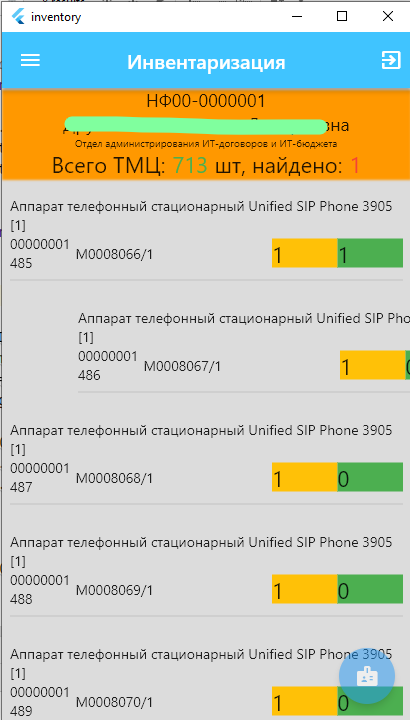
Задача: реализовать удаление позиции из списка «смахиванием».

Решение: используем для этого виджет Dismissible. Обернем в него каждый пункт в ListView. Ну собственно в него можно оборачивать любой виджет.

  child: ListView.builder(
....
...
                                child:
                                Dismissible(
                                    key: UniqueKey(),
                                    direction:DismissDirection.startToEnd,
                                    onDismissed: (DismissDirection direction){
                                        TDialogs dia = TDialogs();
                                        dia.SureDialog(context, "Подтверждение", "Вы действительно удалить ТМЦ  "+globals.TMCList[index]["inv_num"]+" ?",
                                          (){
                                            setState(() {
                                                                                            globals.TMCList.removeAt(index);
                                            });
                                          },
                                          (){
                                            setState(() {});
                                          }
                                        );
                                    },
                                    child: Container(
                                        padding: EdgeInsets.symmetric(vertical: 10),
                                        color: globals.TMCList[index]["count"]==0?Colors.red:null,
                                        child: Column(
                                          children: [
                                            Text(
                                              globals.TMCList[index]["name"],
                                              textAlign: TextAlign.start,
                                            ),
                                            Align(

....

Из интересного: метод direction отвечает за то, как именно разрешено «смахивать». В примере это «от старта до конца». Т.е. слева на право. Доступные варианты:

enum DismissDirection {
  vertical,
  horizontal,
  endToStart,
  startToEnd,
  up,
  down,
  none
}
Flutter: скроллинг до элемента в списке

Задача: позиционировать по нажатию кнопки список на нужном элементе списка.

Решение: используем пакет scroll_to_index:

dependencies:
  scroll_to_index : any

Код:

class _MainMenuState extends State<MainMenu> {
  final scaffoldKey = GlobalKey<ScaffoldState>();

  final scrollDirection = Axis.vertical;
  late AutoScrollController controller;

  @override
  void initState() {
    print("-инициализация класса..");
    controller = AutoScrollController(
        viewportBoundaryGetter: () =>
            Rect.fromLTRB(0, 0, 0, MediaQuery.of(context).padding.bottom),
            suggestedRowHeight: 2000, // если большой список, и  скролл визуально идёт медленно, то это "шаг" скролла. Т.е. чем больше, тем быстрее.
            axis: scrollDirection
    );
  }

  Future _scrollToCounter(int counter) async {

    await controller.scrollToIndex(counter, duration: Duration(seconds: 1));
    controller.highlight(counter);
  }
....
...
      // список ТМЦ для инвентаризации (если есть)
      body: ListView.builder(
          physics: NeverScrollableScrollPhysics(),
          scrollDirection: scrollDirection,
          controller: controller,
          padding: const EdgeInsets.all(8),
          itemCount: globals.TMCList.length,
          itemBuilder: (BuildContext context, int index) {
            return AutoScrollTag(
              key: ValueKey(index),
              controller: controller,
              index: index,
              child: Container(
                  padding: EdgeInsets.symmetric(vertical: 10),
                  child: Column(
                    children: [
                      Text(
                        globals.TMCList[index]["name"],
                        textAlign: TextAlign.start,
                      ),
                      Align(
.....
        floatingActionButton: FloatingActionButton(
          onPressed: (){
_scrollToCounter(10);
          },

Node.js: POST запрос с авторизацией по HTTP

Задача: передать данные через POST на ресурс по протоколу https с авторизацией.

Решение:

const https = require('https');
function SendJson2Https(data){
    const options = {
      hostname: 'vqrcfwervcwe1',
      port: 443,
      path: '/owprfhwoeir/command',
      method: 'POST',
      rejectUnauthorized: false,
      strictSSL: false,
      headers: {
        "Authorization":"Basic " + new Buffer.from('Admin' + ":" + 'qrwecvwervwe').toString('base64'),          
        'Content-Type': 'application/json',
        'Content-Length': data.length
      }
    }
    const req = https.request(options, (res) => {
      console.log(statusCode: ${res.statusCode})
      res.on('data', (d) => {
        process.stdout.write(d)
      })
    })
    req.on('error', (error) => {
      console.error(error)
    })
    req.write(data)
    req.end()    
};
1 2